
We Tested 6 AI Research Tools Against Real Users. Here’s What We Found.
The hype is real. The results are more complicated. Here's what our team actually found after weeks of hands-on testing.

Every week, a new AI research tool promises to change how teams understand their users. Faster insights. Cheaper than recruiting. Results in minutes instead of weeks.
The demo videos are compelling, and the pitch is always some version of the same thing: why spend time and money talking to real users when AI can simulate them for you?
We decided to find out if any of that holds up. Over the course of February and March, The Good’s team of UX researchers and strategists ran hands-on evaluations of six AI user research tools.
We tested them against real client projects, comparing outputs side-by-side with findings from our established methods, and sitting through demos with enough pointed questions to make the sales reps uncomfortable.
Our answer isn’t a simple thumbs up or thumbs down. Some of these tools are genuinely useful for the right team, in the right situation. Others are impressive on the surface, with not much underneath. And nearly all of them, once you get past the marketing language, will quietly acknowledge they can’t replace real user testing.
Here’s what we actually found.
First: “AI user research” is not one category
Before getting into the tools, it’s worth noting something that may not be intuitive to all. “AI user research” is a catch-all term that covers fundamentally different capabilities. Just as we have a variety of research tools and methods as an expert UX agency, the AI tool market includes a variety of tools with fundamentally different capabilities.
As we went deeper, we found most tools fall into one or more of these buckets:
- AI-assisted study setup: Helps you design a study or write a test plan.
- AI-moderated interviews: Replaces a human moderator with AI-guided conversation.
- Synthetic users: Generates AI personas that simulate user responses.
- AI follow-up questions: Dynamic probing within surveys or tests based on participant responses.
- AI analysis and synthesis: Themes survey responses, generates summaries, builds highlight reels.
- AI-driven roadmap and recommendation tools: Scans a site and generates prioritized UX recommendations.
- AI-powered heatmaps: Predicts visual attention without requiring real user data.
Knowing which category a tool belongs to matters because it changes what you should expect from it and what you shouldn’t.
The tools we evaluated
1. Synthetic Users
Category: Synthetic users/AI-assisted study setup
What it does:
Generates AI user profiles and simulates how those users would respond to a screenshot or Figma prototype, producing a full usability report with findings, quotes, and prioritized recommendations.
What we did:
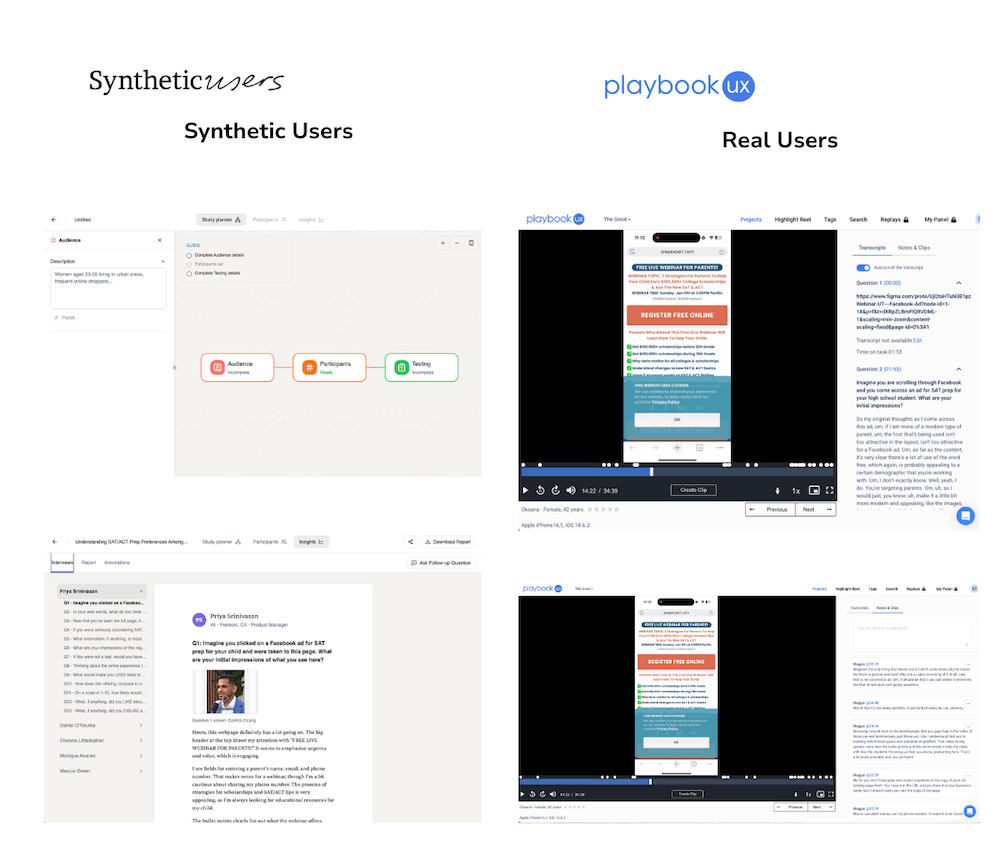
One of our strategists ran the same test through Synthetic Users and through PlaybookUX with real recruited participants. It was the same landing page, with the same research questions. This is as close to a controlled comparison as we could get.
Where the findings matched:
- Both groups flagged information overload and cluttered design as major issues.
- Both raised privacy concerns about submitting a phone number.
- Both produced skepticism about the page’s bold marketing claims.
- Severity rankings were similar across both sets, and some of the language in the synthetic “user quotes” was remarkably close to what real participants said.
Where they diverged:
Synthetic Users can only test screenshots or Figma prototypes, not live URLs. No live interactions, form fills, or navigation behavior. In that way, real users provided behavioral data (where they actually clicked, how long they hesitated, what they scrolled past) that synthetic users can’t replicate.
The report itself output eight sections, including executive summary, task-by-task analysis, error patterns, user flows, learnability, satisfaction ratings, recommendations, and sub-sections. Each section largely repeated the same three or four findings in different formats. An experienced researcher would synthesize this into a focused, actionable deck while the tool generates volume.
The bottom line:
Synthetic Users got the big, surface-level findings right. If your question is “are there obvious issues with this page?”, it can answer that quickly. If your question is “how do real users actually interact with this experience?” it falls short. Think of it as a fast, automated heuristic review. It’s useful as a starting point, not a replacement for behavioral data.
2. Uxia
Category: Synthetic users/prototype testing
What it does:
Creates custom AI-generated users based on the audience information and test plan you provide (a step you can review and refine manually before the test runs). Those users then move through your prototype, and the tool automatically produces a synthesized report with ranked themes, findings, and a shareable output. No manual analysis required.
What we did:
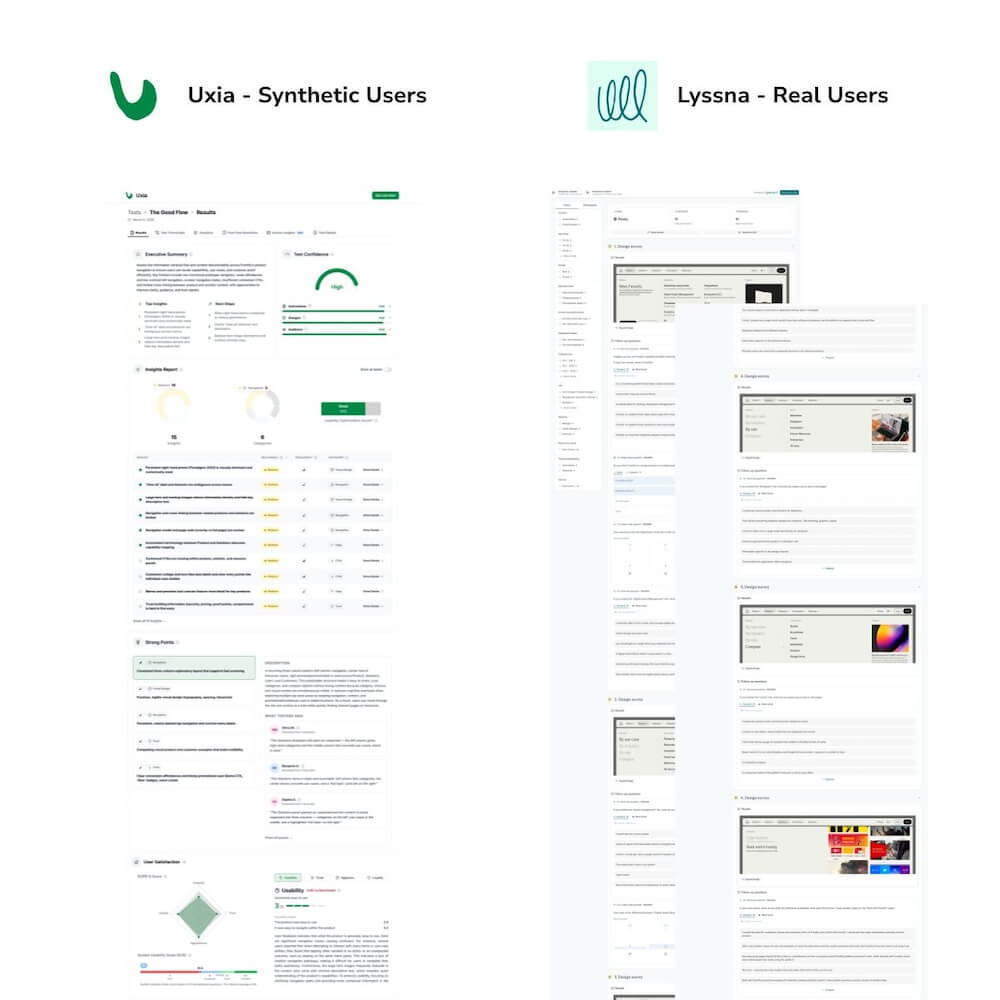
One of our researchers gave Uxia’s team a Figma prototype of a site element that we had already tested and synthesized using Lyssna. This gave us a direct basis for comparison between their AI-generated output and our real user findings.
What worked:
The output is genuinely robust. Themes are already pulled and ranked, the report generates automatically, and it’s ready to share without anyone watching hours of recordings first. For an in-house team without a dedicated researcher, that’s a real time savings.
The AI users also flagged the same top finding that we identified in our test with real users. That kind of alignment on a specific, nuanced finding was notable.
Uxia positions itself honestly as a supplement to real user testing, not a replacement for it. They expect their users to be running studies with real participants alongside the tool, and they’re upfront about that. Researchers using their tool actually conduct more research because of the fast turnaround, not less.
Where they diverged:
AI users interpreted placeholder imagery as real content and confused a navigation menu for a standalone page.
Our team’s assessment: it doesn’t have the emotional intelligence a human user would.
What Uxia catches are surface-level friction points, including broken flows, confusing layouts, and missing content hierarchy. What it misses are the nuanced reactions that drive the most valuable optimization decisions.
The deeper limitation is scope. Many of the test types we run with human participants simply cannot be conducted with synthetic users. If 20 out of 30 real users say something similar, that’s a trustworthy signal built from independent behavior. If AI generates 30 synthetic responses that say the same thing, that’s one opinion multiplied.
Price is custom per team.
The bottom line:
Uxia works best as a pre-step. Running a prototype through it before live user testing to catch dead ends early, or to inform A/B test concepts, could be helpful. It’s not a replacement for behavioral research. The tool’s honest positioning about this was one of the more refreshing things we encountered in this evaluation.
3. Maze
Category: AI-moderated interviews / unmoderated testing
What it does:
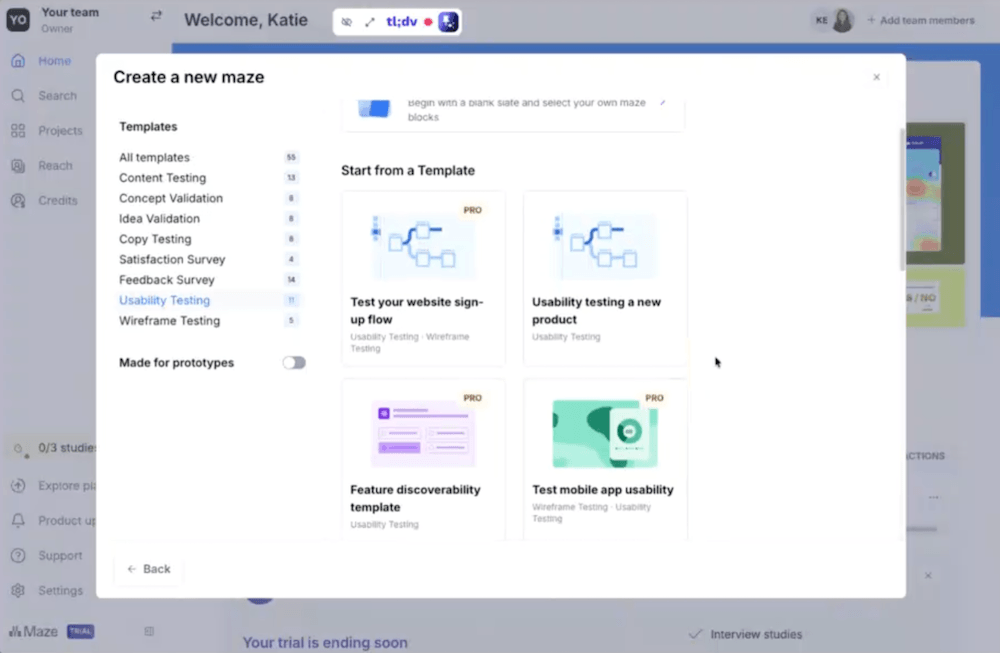
Unmoderated usability testing platform that’s bolting on AI features, including AI-moderated interviews. Functionally similar to Lyssna, with AI moderation as the main differentiator.
What we did:
Our team ran a full walkthrough and tested its core capabilities.
What we found:
Maze predates AI. It’s a standard unmoderated testing tool that’s adding AI capabilities, not a purpose-built AI research solution. The AI moderation feature is built for teams that run a high volume of moderated studies and want to scale without adding headcount.
The AI follow-up question feature, which probes participants based on their responses, felt shallow in practice. It pulls a word from what someone typed and asks them to elaborate. One of our team members called it “advanced survey piping.” It’s an improvement over a static questionnaire, but it’s not a substitute for a skilled moderator who follows a line of inquiry.
The bottom line:
This is a capable unmoderated testing tool. The AI moderation pitch is most relevant to agencies or in-house teams running dozens of moderated sessions monthly. If you’re already using Lyssna and happy with it, there’s no compelling reason to switch.
4. Strella
Category: AI-moderated interviews/analysis and synthesis
What it does:
Replaces human moderators with AI-guided voice interviews, then auto-generates highlight reels, segmentation analysis, and synthesized findings reports.
What we did:
One of our researchers completed a demo and detailed review of capabilities and pricing.
What we found:
Strella’s synthesis features are genuinely interesting. Auto highlight reels, AI-generated segmentation, and an analysis interface that lets you ask questions of your data are all capabilities that could save significant time for teams running large volumes of qualitative research.
The problem is the price at $5,000 or more per project, not including participant recruitment or incentives. That math only works for organizations doing frequent, large-scale interview research.
We also acknowledge a gap in our evaluation here: we weren’t able to run a direct comparison of a real moderated interview against an AI-moderated one, because we don’t often conduct live moderated sessions for clients. Before making a definitive claim about quality differences, we’d want to test that directly. What we can say is that the tool solves problems a specific type of research operation has, not most in-house optimization teams.
The bottom line:
Potentially compelling for agencies or enterprise teams doing 20+ moderated studies a year. At current pricing, it’s a hard sell for most others. The synthesis capabilities are the most interesting part of the product, and we will be watching for those features to appear in more accessible tools.
5. Baymard UX-Ray
Category: AI-driven roadmap and recommendation tool
What it does:
Scans a website and generates a prioritized UX recommendation report, pulling from Baymard’s extensive research library to categorize and rank issues by page type and severity.
What we did:
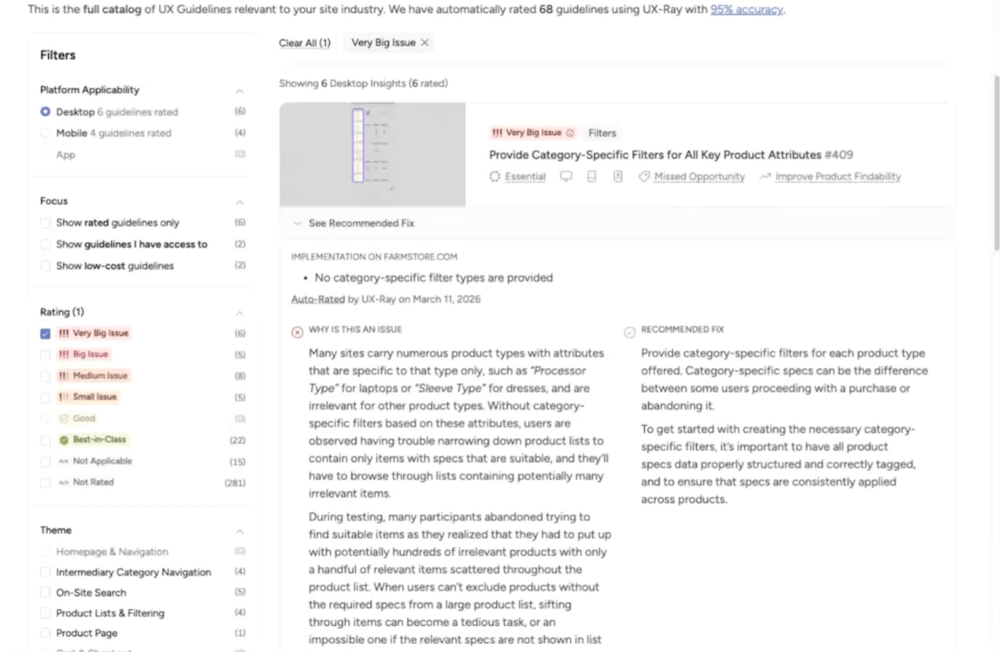
We evaluated UX-Ray’s output against a real site, reviewed the tool’s methodology, and attended a Baymard-led NNG webinar where the founders discussed AI accuracy in UX recommendations.
What we found:
UX-Ray generated 342 UX insights for one site, a number that sounds impressive until you’re in the report and realize that quantity isn’t the same as usefulness. Many of the insights are gated behind paid tiers, and without the ability to prioritize by business impact, revenue potential, or implementation effort, a list of 342 findings is as overwhelming as it is informative.
The tool’s presentation is polished: dynamic, clickable, and organized by page type with thumbnail previews. And Baymard’s content library is a trusted source in UX research, whose credibility carries into the tool.
But the more fundamental limitation isn’t accuracy, it’s context. UX-Ray scans your site against a library of best practices and known UX patterns. It has no visibility into who your actual users are, how your specific audience behaves, or where your real conversion friction lives.
Entering a URL without that context assumes a lot. A recommendation that’s technically correct by best-practice standards may be irrelevant, or even counterproductive, for your particular visitors and traffic mix. Best practices are a starting point, not a strategy. That’s as true here as it is anywhere else in optimization.
Mid-tier pricing is $399 per month.
The bottom line:
Useful for teams that want a structured starting point for a UX audit and have the expertise to evaluate and filter the output. It’s not a replacement for a research-informed optimization strategy. The accuracy caveat matters; a list of 342 recommendations that’s 70–95% correct still requires an expert to separate the signal from the noise.
6. Brainsight
Category: AI-powered heatmaps
What it does:
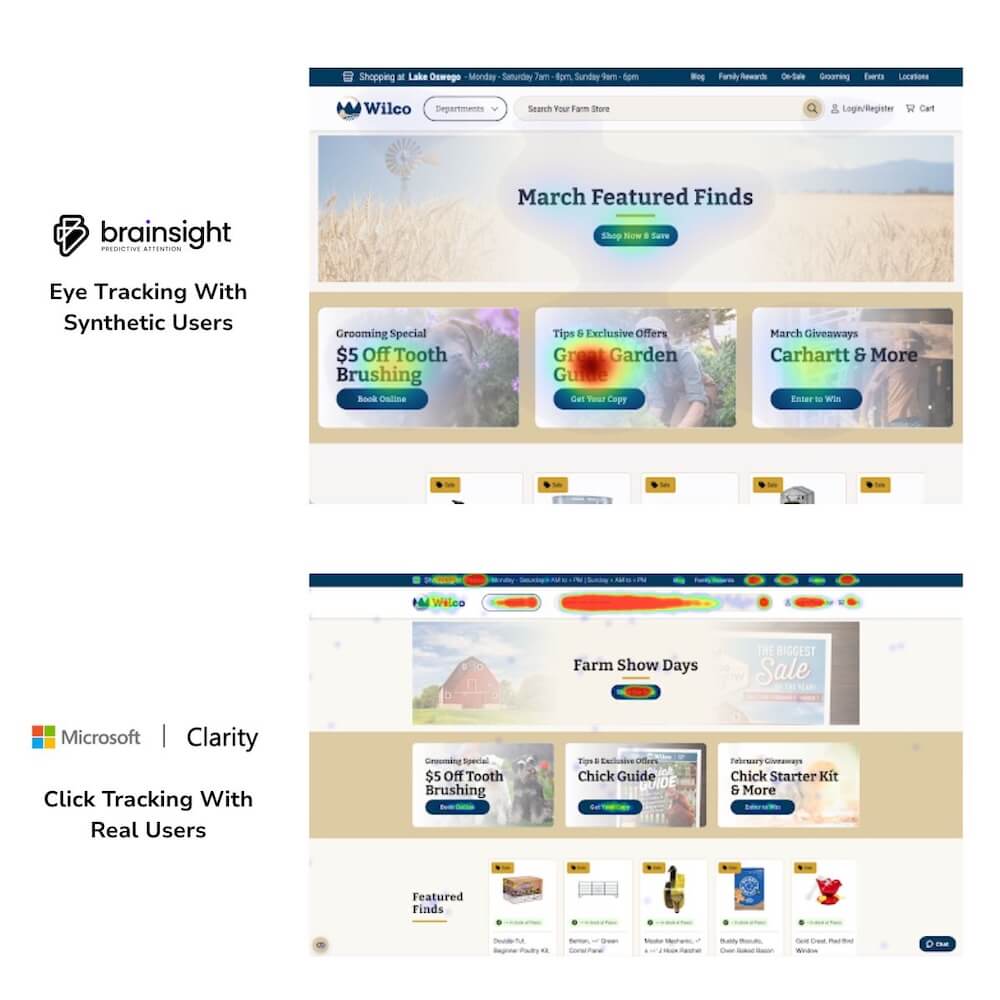
Generates predictive attention heatmaps without requiring real user data, using AI trained on eye-tracking studies to model where users will look on a given page.
What we did: Unlike the other tools in this evaluation, we already use Brainsight in select client work. We’ve used it extensively enough to have a genuine, experience-based opinion.
What we found:
Of all the tools in this evaluation, Brainsight is the one we recommend most readily. But we present it with caveats, because that’s the honest way to use it.
The predictive heatmaps are reliable as a starting point. The tool reads contrast, copy, imagery, and dark areas on screen and makes assumptions about where human attention will land. That works often enough to be useful.
They also compare favorably to DIY AI heatmap alternatives (which our team found consistently unreliable), and the tool is priced accessibly enough to function as a genuine entry point for teams that haven’t yet invested in full heatmap research.
But it’s modeling visual salience, not actual user behavior. A true heatmap might show no heat on a long block of text that the AI flagged as a high-attention area, because real users navigated away without reading it. The AI doesn’t know that. It sees contrast; it doesn’t see intent.
So, this is a good starting point, not a definitive picture. If you want heatmap data you can trust completely, that comes from real users in a full engagement.
Here’s how we’d describe Brainsight to any client considering it: it gets you to 70% of the answer faster and cheaper than doing nothing. You’ll see where attention concentrates, where it drops off, and what’s fighting for visual priority.
The remaining 30%, understanding why users look where they look, what they do next, and what it means for your conversion strategy, is where a full optimization strategy makes the difference.’
Brainsight is also adding AI-generated recommendations following the heatmap output, a feature we haven’t fully evaluated yet. We’ll be watching it closely.
The bottom line:
This is a tool we use and would actively recommend as a starting point. Best positioned as an affordable entry into attention data, with the honest caveat that real engagement data tells you more.
What we learned across all of it
After evaluating all six tools, a few themes cut across the whole category.
They find the obvious. They miss the subtle.
In every comparison, AI-generated findings matched the surface-level issues an experienced researcher would spot in the first ten minutes of reviewing a page, for example, information overload, privacy friction, and confusing hierarchy.
The gap shows up in depth: navigation hesitation, emotional reactions, and the unexpected workaround a user invents that tells you your information architecture is broken. For high-stakes optimization decisions, the subtle findings are where the value lives.
More output is not better output.
Volume was the consistent way these tools tried to signal quality. 342 UX insights. Eight report sections for a single landing page. 12-page persona profiles in under a minute. Quantity without prioritization and context is noise. A skilled researcher delivers fewer, better, more actionable insights and knows which ones actually matter.
They’re genuinely useful for teams starting from zero.
This is worth saying clearly. An in-house optimization team that has never run a user test would benefit from these tools. Getting 70% of the answer is better than getting none.
These tools lower the barrier to research-informed decision-making. The risk isn’t using them, it’s treating their output as final rather than as a starting point that needs validation with real users.
The best use cases aren’t what the tools advertise.
The most promising applications we found weren’t the primary pitch of any tool we evaluated. Running a prototype through a synthetic user tool before live user testing to catch dead ends. Using Brainsight as a fast stakeholder-conversation starter. Using AI synthesis tools to surface patterns in data that a team has already collected but hasn’t had time to analyze. None of these tools market themselves this way, which our team found consistently surprising.
The vendors themselves will tell you.
This was the most telling finding of the entire evaluation. Every single tool vendor, once you moved past the landing page and into a real conversation, acknowledged that their tool won’t replace real user testing. When the sellers aren’t making the replacement claim, pay attention.
When to use AI research tools (and when not to).
AI tools earn their place when you’re tracking patterns over time, when the problem is well-defined and the stakes are low, when you need directional input quickly and the alternative is doing nothing, or when you’re QA-checking a prototype before investing in live user testing.
Keep humans in the lead when the decision is high-stakes, when you need behavioral data (not just stated responses), when you’re entering an unfamiliar market, or when you need findings you can defend with evidence.
For most teams, the answer isn’t either/or. These tools slot into a research process as a first step, a pre-launch check, or an accelerator for analysis you’re already doing. Their ceiling is lower than the marketing suggests, and their floor is higher than the skeptics give them credit for. Use them where they fit.
Frequently asked questions on AI user research
Can AI replace user research?
As of right now, no. And the vendors building these tools will tell you the same thing.
AI research tools can surface obvious usability issues, generate directional insights quickly, and lower the barrier to research-informed decision-making for teams that have never run a study before.
What they can’t do is replicate real user behavior: the navigation hesitation, the emotional response, the unexpected workaround that tells you something important about your experience.
For low-stakes, directional questions, AI tools are a reasonable starting point. For decisions that matter, real users are non-negotiable.
What is the difference between Synthetic Users and Uxia?
Both tools generate AI-simulated users to evaluate a design, but they serve slightly different purposes. Synthetic Users runs AI personas through screenshots or Figma prototypes and produces a full usability report with findings, quotes, and severity ratings, functioning most like an automated heuristic review.
Uxia takes a similar approach but focuses more specifically on prototype testing and positions itself explicitly as a first step alongside, not instead of, real user research.
In our side-by-side comparisons, both tools got the big surface-level findings right and missed the behavioral nuance. Uxia’s honest framing about its own limitations stood out as a green flag.
Is Brainsight accurate?
In our experience, yes. More so than DIY AI heatmap alternatives, which our team found consistently unreliable.
Brainsight’s predictive heatmaps are trained on real eye-tracking data and produce results we’ve found dependable enough to use in client sprint work. That said, predictive heatmaps model where users are likely to look based on visual patterns, they don’t capture actual user behavior, intent, or what users do after their attention lands somewhere.
We use Brainsight as a fast, accessible starting point. Real engagement data from actual sessions tells a more complete story.
How accurate are AI-generated UX recommendations?
According to Baymard’s own founders, AI-generated UX recommendations are generally around 70% accurate across the industry.
Baymard claims their UX-Ray tool performs at approximately 95%, but even at that rate, a meaningful portion of recommendations in any given report shouldn’t be implemented without validation.
The more important point: Baymard itself says all AI-generated recommendations require testing before you act on them. A tool that generates hundreds of insights you still need to verify manually isn’t saving as much time as the pitch suggests.
When should a team use AI user research tools?
AI research tools make the most sense when the alternative is doing no research at all, when you need quick directional input on a well-defined and lower-stakes question, when you’re doing pre-launch QA on a prototype before investing in live testing, or when you have existing data that needs faster synthesis.
They make the least sense when you’re making high-stakes optimization decisions, entering an unfamiliar market, or need findings you can defend with behavioral evidence. For those situations, real users and experienced researchers aren’t optional; they’re the whole point.
Do AI user research tools save time?
For teams with established research processes, the promised time savings largely didn’t materialize in our evaluation. Research teams can build test plans in their sleep and likely use AI to assist with analysis.
The tools that promised speed often delivered volume, lengthy reports that repeated the same findings across multiple sections, requiring a researcher to synthesize the synthesis.
For teams earlier in their research maturity, the time savings are more real: automating analysis and report generation genuinely helps when the alternative is doing it manually from scratch. But they will likely be bogged down in these unnecessarily long reports.
The verdict
We say the same thing about AI user research tools that we say about best practices: they’re a starting point, not a strategy. They get teams that have never done research to 70% of the answer. For a team with established processes and real users to test with, they don’t solve problems we have.
The hype runs well ahead of the utility, and the most dangerous outcome isn’t a team using these tools and getting incomplete results; it’s a team using them and thinking they have the full picture.
The last 30% of research quality, the part that connects real human behavior to your most important optimization decisions, still requires real users, real data, and experienced researchers who know what to do with both.
Not sure where AI tools fit in your research process…or if they should? Our team has done the testing. Book a call and let’s talk through it.
About the Author
Katie Encabo
Katie Encabo is the Customer Success Manager at The Good. She focuses on supporting and improving the experience of top-performing ecommerce and SaaS growth teams as they optimize the digital experience for their users.